Edge protection
Edge protection allows you to integrate Private Captcha challenges directly to your web-server (e.g. Caddy, Nginx) or CDN (e.g. Bunny CDN) to challenge visitors before they reach your website (at the “edge”). After passing the challenge, each visitor is authorized for a specific duration of time to access resources without challenges.
You can see a demo page here.
How it works
Step 1. Integration
You integrate Private Captcha edge protection with your web-server or CDN (details below).
You can find ready snippets for Caddy, Nginx and Bunny CDN. We offer a lightweight sidecar that acts as an authorizer for requests. You configure which requests to authorize yourself in your web-server or CDN.
Step 2. Challenge
Visitors are presented with a challenge.
During scraping (or other unusual bot traffic) challenge difficulty grows exponentially, functioning like a rate limiter at the expense of bots resources. Users are getting lighter challenges.
You can fine-tune challenge difficulty using custom difficulty rules.
Step 3. Temporary pass
After solving a challenge, each visitor is given a signed token with which they can access a website without challenges during a configurable period of time (“Verified access duration”). After token expiration, visitor has to solve the challenge again.
Using difficulty rules you can change token validity duration based on multiple conditions. For example, issuing tokens of smaller duration for specific IP ranges (e.g. VPN, Data centers), specific countries or values of User-Agent header.
Configuration
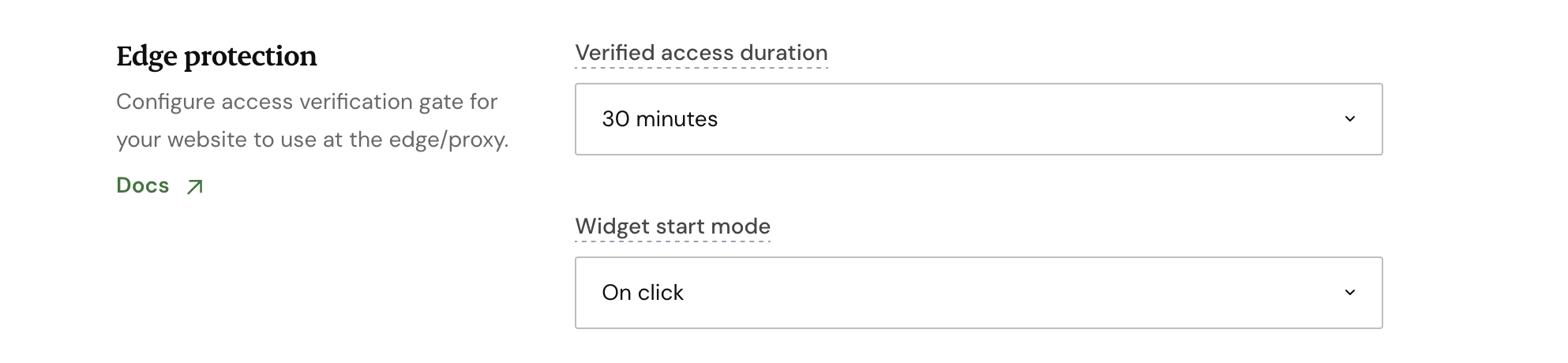
Verified access duration
Edge protection is disabled by default. To enable it, select "Verified access duration" value other than "Disabled": you can choose time from 5 minutes to 24 hours.
This setting means how long each visitor can access your resource without triggering another challenge.
Changing access duration in runtime
You can configure variable access duration depending on a number of conditions (User-Agent, Country, IP range etc.) using a difficulty rule.

For example, having default validity interval as 30 minutes, you can change it to 5 minutes if the request is coming from AWS Data Center IP range.
Widget click mode
Challenge page contains a CAPTCHA widget, that can either start solving automatically (if you select On load) or requires a user interaction (On click). Automatic solving offers less protection, but smoother user experience.
Integration
Installation
If you’re deploying edge protection on premises (e.g. alongside of your web server), you need to use a binary of edge-sidecar server either directly or via docker image (we provide both).
In examples below we assume sidecar runs on
:8080and your app runs on:9000
Prerequisites
Edge-sidecar requires an existing property and API key created in the Portal. You can follow the Getting started tutorial to create them.
Systemd
If you’re installing edge-sidecar as a systemd service, we have a hardened template suggestion. Edge-sidecar is a service with an absolutely minimal interface/attack surface and is significantly locked down with systemd. If you’re using Caddy or nginx, you can also make it start after it by modifying After= directive.
Docker
If you’re using Docker in production, here’s the minimal service you can add:
services:
  privatecaptcha-edge-sidecar:
    image: ghcr.io/privatecaptcha/edge-sidecar:latest
    environment:
      STAGE: prod
      PC_HOST: 0.0.0.0
      PC_PORT: "8080"
      PC_SITEKEY: ${PC_SITEKEY:?Set PC_SITEKEY in .env}
      PC_API_KEY: ${PC_API_KEY:?Set PC_API_KEY in .env}
      PC_PROTECTED_ORIGIN: https://mywebsite.com
      #PC_TRUSTED_PROXY_HOSTS: caddy
    restart: unless-stopped
Caddy usage
Caddy uses the built-in forward_auth directive to authorize requests before forwarding them to your application.
Sample Caddyfile
example.com {
    @public path /.well-known /.well-known/* /robots.txt /favicon.ico *.xml *.rss *.atom

    route {
        # Public paths — bypass all verification
        handle @public {
            reverse_proxy 127.0.0.1:9000
        }

        # PrivateCaptcha completion endpoint
        handle /__privatecaptcha/complete {
            reverse_proxy 127.0.0.1:8080 {
                header_up X-Forwarded-Host {http.request.hostport}
                header_up X-Forwarded-Proto {scheme}
                header_up X-PC-Client-IP {remote_host}
                transport http {
                    dial_timeout 5s
                    response_header_timeout 12s
                }
            }
        }

        # Protected website
        handle {
            forward_auth 127.0.0.1:34635 {
                uri /auth
                header_up X-Forwarded-Host {http.request.hostport}
                header_up X-Forwarded-Proto {scheme}
                header_up X-Forwarded-Uri {uri}
                header_up X-Forwarded-Method {method}
                header_up X-PC-Client-IP {remote_host}
                transport http {
                    dial_timeout 5s
                    response_header_timeout 12s
                }
            }

            reverse_proxy 127.0.0.1:9000
        }
    }
}| Edge sidecar installation method | Environment |
|---|---|
| Non-docker | PC_TRUSTED_PROXY_CIDRS = 127.0.0.1/32 |
| Docker | PC_TRUSTED_PROXY_HOSTS: caddy |
Check here for more details about Caddy integration.
Nginx usage
Nginx uses auth_request to authorize requests before forwarding them to your application. nginx must include ngx_http_auth_request_module (nginx -V shows its build flags). nginx Plus is not required.
Nginx configuration example
Save this shared snippet as /etc/nginx/snippets/privatecaptcha-sidecar.conf:
proxy_http_version 1.1;
proxy_set_header Connection "";
proxy_set_header X-Forwarded-Host $http_host;
proxy_set_header X-Forwarded-Proto $scheme;
proxy_set_header X-PC-Client-IP $remote_addr;
proxy_connect_timeout 5s;
proxy_read_timeout 12s;
proxy_buffer_size 8k;
proxy_cache off;
proxy_intercept_errors off;
Add the following inside nginx’s http context, for example in /etc/nginx/conf.d/privatecaptcha.conf. Replace the domain, upstream addresses, and certificate paths with your deployment’s values.
/.well-known, /.well-known/*, /robots.txt, /favicon.ico, and paths ending in .xml, .rss, or .atom bypass auth and proxy directly to the application.
map $http_upgrade $pc_connection_upgrade {
    default upgrade;
    ''      '';
}

upstream privatecaptcha_authorizer {
    server 127.0.0.1:8080;
}

upstream privatecaptcha_app {
    server 127.0.0.1:9000;
}

server {
    listen 443 ssl;
    server_name example.com;
    ssl_certificate /etc/nginx/tls/server.crt;
    ssl_certificate_key /etc/nginx/tls/server.key;

    location = /__privatecaptcha/complete {
        auth_request off;
        client_max_body_size 1m;
        include /etc/nginx/snippets/privatecaptcha-sidecar.conf;
        proxy_next_upstream off;
        proxy_pass http://privatecaptcha_authorizer;
    }

    location = /__privatecaptcha/auth {
        internal;
        auth_request off;
        include /etc/nginx/snippets/privatecaptcha-sidecar.conf;
        proxy_method GET;
        proxy_pass_request_body off;
        proxy_set_header Content-Length "";
        proxy_set_header X-Forwarded-Method $pc_original_method;
        proxy_set_header X-Forwarded-Uri $request_uri;
        proxy_set_header Accept "";
        proxy_pass http://privatecaptcha_authorizer/auth;
    }

    location = /__privatecaptcha/gate {
        internal;
        auth_request off;
        include /etc/nginx/snippets/privatecaptcha-sidecar.conf;
        proxy_method GET;
        proxy_pass_request_body off;
        proxy_set_header Content-Length "";
        proxy_set_header X-Forwarded-Method $pc_original_method;
        proxy_set_header X-Forwarded-Uri $request_uri;
        proxy_pass http://privatecaptcha_authorizer/auth;
    }

    location ^~ /__privatecaptcha/ {
        return 404;
    }

    # Public paths bypass verification.
    location ~ ^/(?:\.well-known(?:/|$)|robots\.txt$|favicon\.ico$)|\.(?:xml|rss|atom)$ {
        auth_request off;
        proxy_intercept_errors off;
        proxy_http_version 1.1;
        proxy_set_header Upgrade $http_upgrade;
        proxy_set_header Connection $pc_connection_upgrade;
        proxy_set_header Host $http_host;
        proxy_set_header X-Forwarded-Host $http_host;
        proxy_set_header X-Forwarded-Proto $scheme;
        proxy_set_header X-Forwarded-For $remote_addr;
        proxy_pass http://privatecaptcha_app;
    }

    location / {
        set $pc_original_method $request_method;
        auth_request /__privatecaptcha/auth;
        error_page 401 = /__privatecaptcha/gate;
        proxy_intercept_errors off;
        proxy_http_version 1.1;
        proxy_set_header Upgrade $http_upgrade;
        proxy_set_header Connection $pc_connection_upgrade;
        proxy_set_header Host $http_host;
        proxy_set_header X-Forwarded-Host $http_host;
        proxy_set_header X-Forwarded-Proto $scheme;
        proxy_set_header X-Forwarded-For $remote_addr;
        proxy_pass http://privatecaptcha_app;
    }
}
Repeat set $pc_original_method, auth_request, and error_page in every protected application-serving location you add. Public locations use auth_request off instead. The ^~ on /__privatecaptcha/ keeps reserved paths out of the public regex location; exact auth, gate, and completion locations still take precedence.
| Edge sidecar installation method | Environment |
|---|---|
| Non-docker | PC_TRUSTED_PROXY_CIDRS = 127.0.0.1/32 |
| Docker | PC_TRUSTED_PROXY_HOSTS: nginx |
Check here for more details about Nginx integration.
Bunny CDN
Warning
Bunny Edge scripts incurr costs. Please check Scripts billing
We offer a ready-made Edge script that you can copy and paste to your account.
- Open Bunny Scripts dashboard and create a new Middleware script. Copy our script there and press “Save”
- Add Environment variables:
PC_SITEKEYwith the value from Private Captcha dashboard,PC_PROTECTED_ORIGINequal to the domain name of your Pull Zone in Bunny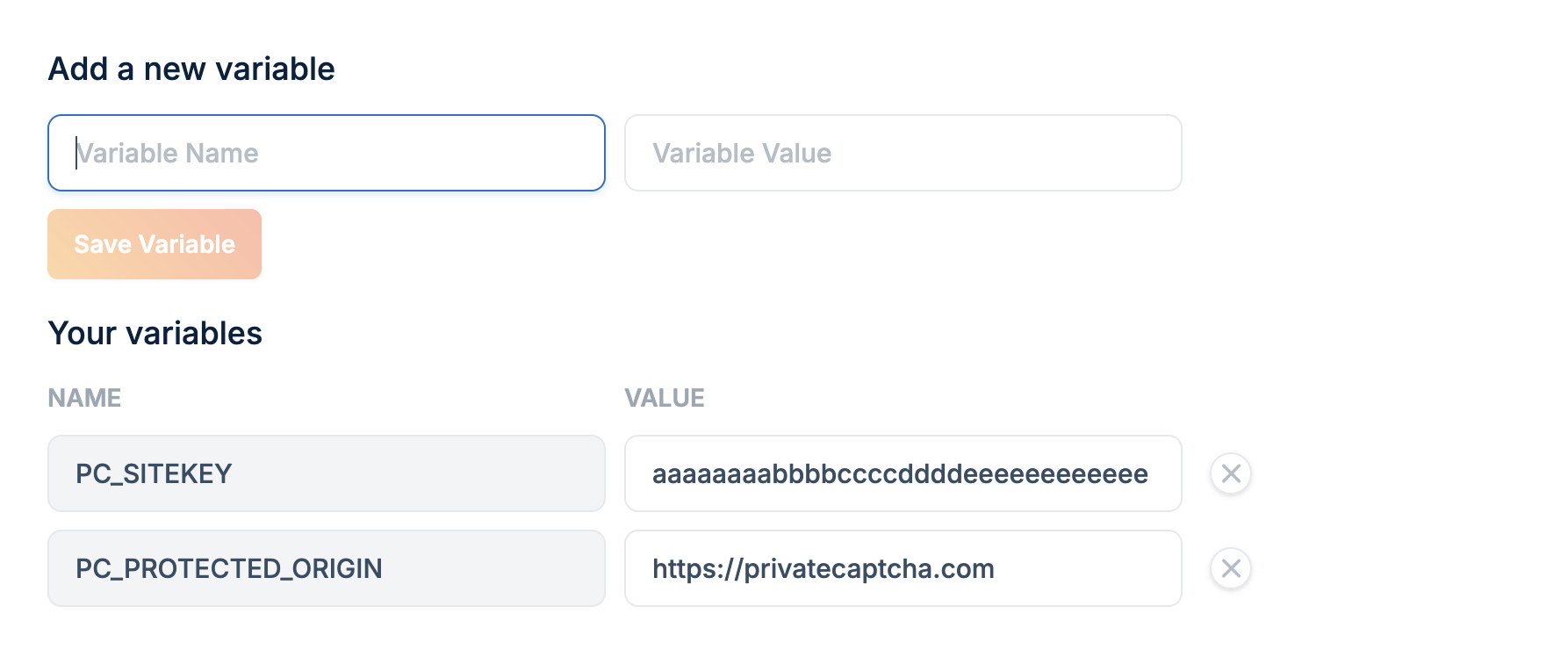
- Add Secret
PC_API_KEYthat you created in Private Captcha portal - In your Pull Zone settings (section “Origin -> General”), select Middleware script that you previously created.
Info
Middleware script can run before or after cache in your Pull Zone. If it runs after cache, it is possible to serve content without verification by Private Captcha, but this can be mitigated by setting lower Cache-Control duration. If it runs before cache, all requests are verified, but with more Edge scripts executions.
Make sure POST requests are not blocked in the Bunny’s Pull Zone.
Check here for more details about Bunny CDN integration.
Troubleshooting
For issues with edge-sidecar service check service logs and our GitHub issues.
For issues with Bunny Edge script, check script logs first.
You can always contact support in the Private Captcha portal.